
USA Lacrosse Membership Verification
If you have a TeamSnap registration form, you can verify registrant membership with USA Lacrosse within your registration form, and ensure that those with expired or soon-to-be-expired memberships will be prompted to update them with USA Lacrosse. Here's how:
In this article:
Connecting USA Lacrosse Verification to TeamSnap for Business Registration - New!
Connecting USA Lacrosse Verification to TeamSnap for Clubs & Leagues - classic
TeamSnap for Business Registration - New!
If your organization is US based and has a program set to “Lacrosse”, and you have upgraded to our most recent Registration 2.0 platform, you will be able to turn on USA Lacrosse verification per reg form:
To enable USA Lacrosse verification, simply toggle on the "USA Lacrosse Member ID Verification", and all participants within the form will have to pass verification before selecting a registration option and completing registration.
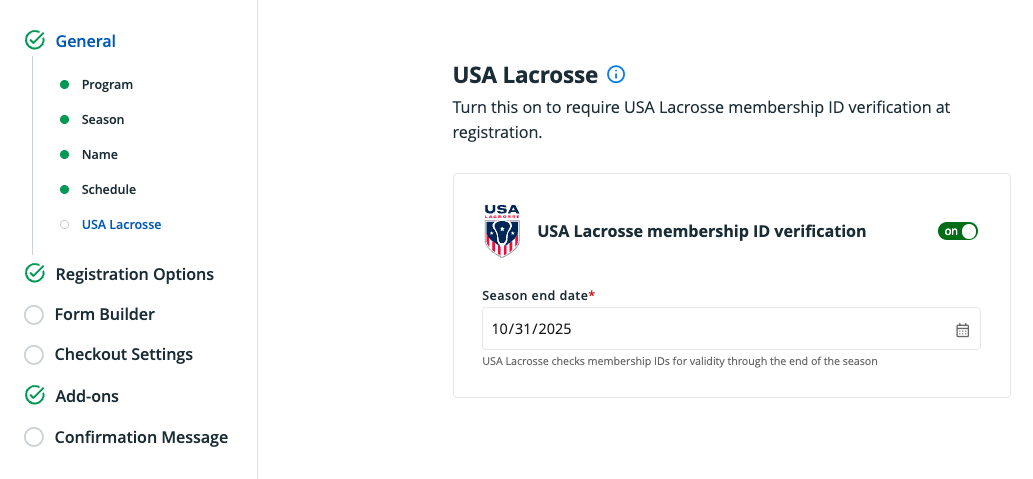
When the verification is toggled on, you will be required to input a season end date. This is the date that all memberID’s will be validated against.
For Registrants:
After selecting a participant, you will be navigated to the USA Lacrosse member validation page:
From here, you can:
- Edit participant profile information: This is a quick link to update profile information if validation fails due to first name, last name, or birthdate.
- USA Lacrosse confirmation number: Input field for the 14 character confirmation number issued by USA Hockey.
- Get member ID: Link to USA Lacrosse to purchase a confirmation number.
Once you've completed this step, you can proceed with registration!
New for TeamSnap for Business registration! Players with a pending membership can register right away while receiving clear instructions to verify their age, including a link that opens in a new tab so they don’t lose their place. A daily overnight job automatically updates membership statuses for 90 days after registration, and admins can easily track each player’s status in registration reports. Confirmation emails also include pending verification reminders, making compliance easier and the registration experience smoother for everyone.
Classic Registration
- Log into TeamSnap.
- Enter your club or league under the My Organizations section of the Dashboard screen.
- Click the Registration tab.
- To create a new form with the verification fields:
- Click the +New Registration Form button.
- Select USA Lacrosse Membership from the template dropdown.

- You will see the verification fields under sport info when building out your form.

- Continue to complete the rest of your form set up as usual.
- To add the verification fields to an existing form:
- Click the three-dot Admin button for the form you'd like to add verification to and select Edit.
- Click the Verify Membership button.

- Check the Status checkbox.
- Select your season end date.
- Click Save.
- Click the Done Editing this Form button when ready.


What's Next
Your registrants will see the verification fields on their form during registration in the Sport Info section, where they can enter their USA Lacrosse member ID (the membership expiration field is for storing data from USA Lacrosse and is not displayed in the registrant view). The email they enter should also match their USA Lacrosse membership email. Participants who need to renew their USA Lacrosse membership, will not be able to complete registration until that is done.

Troubleshooting Validation Errors
-
API connectivity issues (500/401/403, etc): “USA Lacrosse verification service not available, please try again later.”
Member id not found: “No matching USA Lacrosse record found.”
Invalid through season end date: “USA Lacrosse Membership ID is invalid for this registration season end date.”
if user enters a membership id longer than 12 digits: “USA Lacrosse Membership ID should be 12 digits.”
- NOTE: if user enters less than 12 digits, TeamSnap will automatically add leading zero’s upon submission.
- if status is “inactive”, “suspended”, “terminated”, “unknown” or any other than “active” or “pending”: “Membership status invalid, please contact USA Lacrosse”
- Membership ID is invalid for form season end date: “USA Lacrosse Membership ID is invalid for this registration season end date.”
- If participant that has already been verified is selected for an additional registration option, verification flow must be completed again, but we will pre-fill the confirmation number for the participant
USA Lacrosse age verification in classic registration:
When members pay for USA Lacrosse membership, they receive a 365-day expiration date and have 15 days to complete age verification. If age verification isn't completed within 15 days, their status changes to "suspended" but their expiration date remains unchanged. Since TeamSnaps classic registration validation only checks expiration dates (not suspension status), suspended members can still register through the system. Admins cannot track these suspended registrations through TeamSnaps classic registration, though suspended members will likely complete verification before actually participating in events. Admins using TeamSnaps classic USA lacrosse validation should confirm the participants status direct at USA Lacrosse prior to participation. Please talk to your account representative about upgrading to TeanSnap for Business registration for enhancements to better support USA Lacrosses age verification requirements.